
FAQs
How to Redeem Funds?
Login Using PAN Details:
Step 1: Click on the Existing User icon to log in with your PAN number or User ID and Password.
Step 2: Enter your PAN and click Submit.
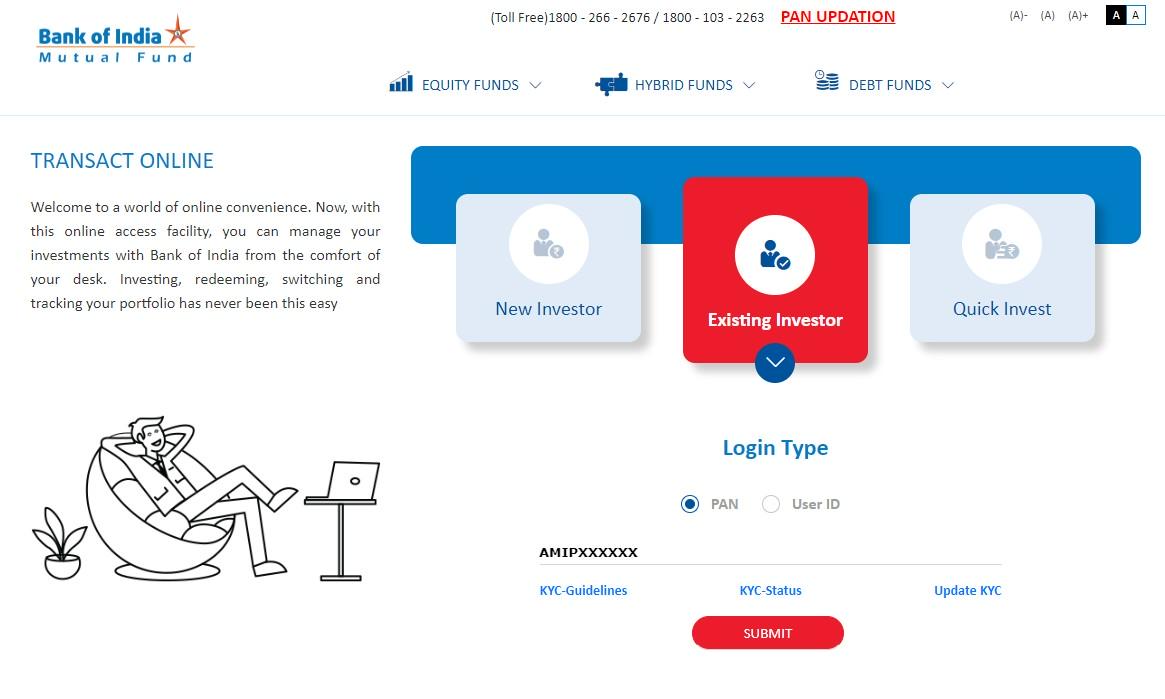
Step 3: On the OTP Verification pop-up, an OTP will be sent to your registered email and mobile number. Enter this OTP and click Submit to access the BOIMF Investor Dashboard.

Transacting After Login: You are now on BOIMF investor dashboard. You can proceed with transactions through two convenient options:
Option 1: Transact Icon in the Header:
Select the Transact icon in the header to view various transaction options:
- Additional Purchase: Add to your existing funds.
- SIP/SWP/STP: Manage Systematic Investment (SIP), Withdrawal (SWP), and Transfer Plans (STP).
- Switch: Transfer funds between schemes within the same fund family.
- Redemption: Withdraw or redeem your investment.
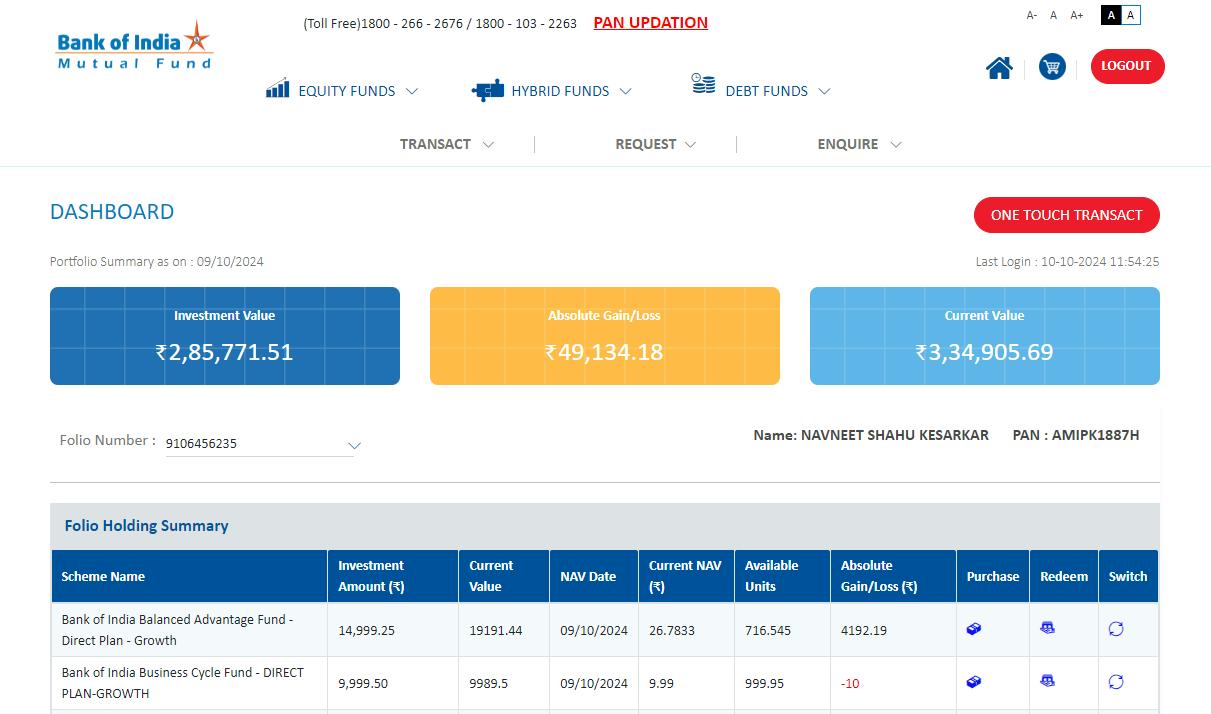
Option 2: One Touch Transact on the Dashboard:
- Click the One Touch Transact button for quick access to the transaction menu.
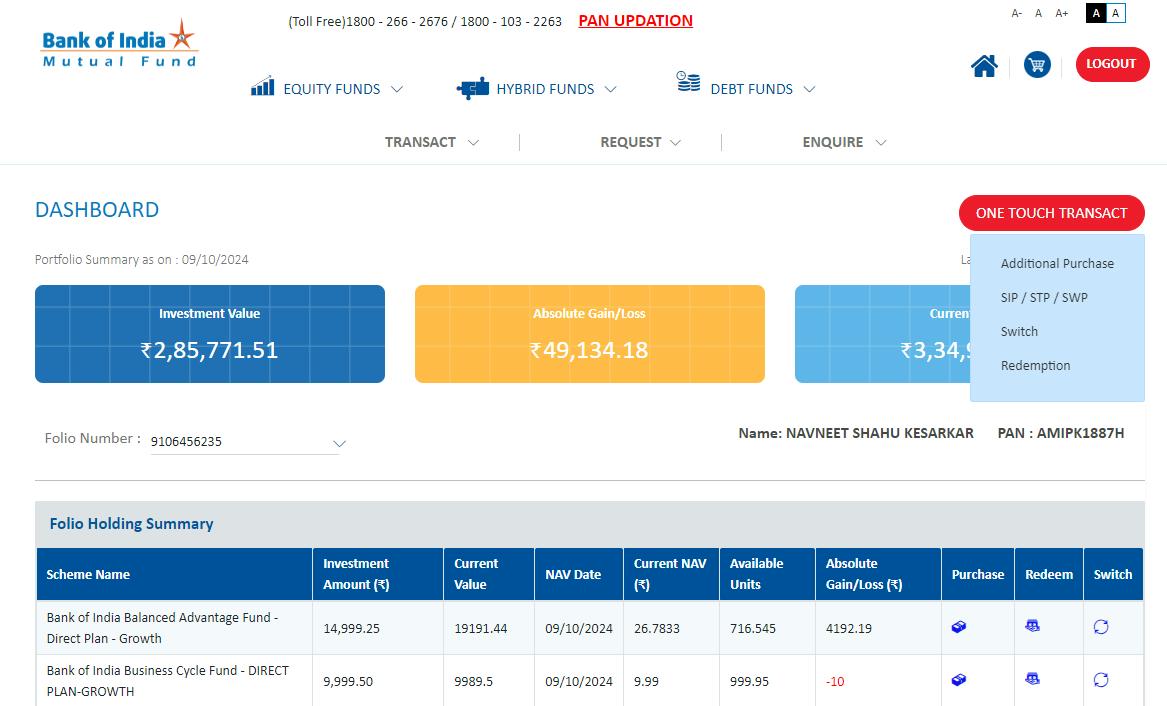
Option 2: One Touch Transact on the Dashboard:
Steps to Redeem Your Investment
Step 1: Select Redemption
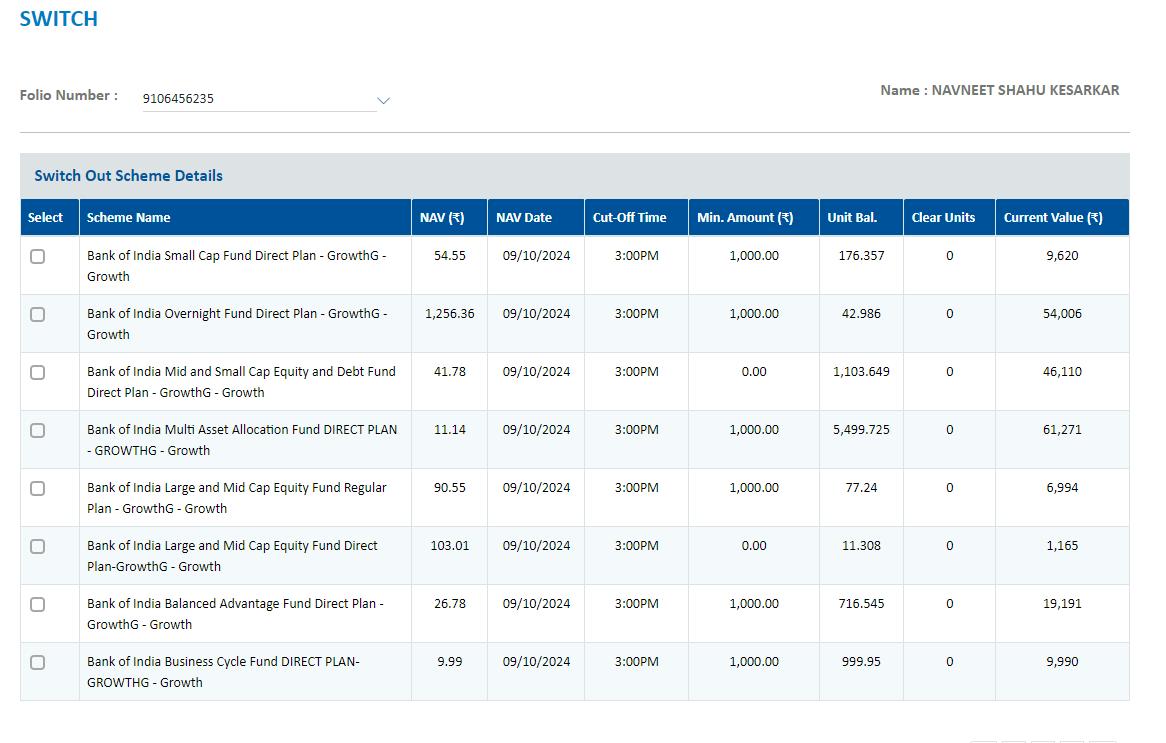
Step 2: View Invested Schemes
On the Redemption page, you’ll see a list of your currently invested schemes.
Step 3: Select Your Scheme
Choose the specific scheme you wish to redeem.
Step 4: Choose Redemption Type
Decide between:
Partial Redemption: Specify the amount or number of units you wish to redeem.
Full Redemption: Redeem your entire investment in the selected scheme.
Step 5: Enter Amount or Units
If you chose Partial Redemption, enter the amount (in currency) or the number of units you wish to redeem.
Step 6: Enter Bank Details
Provide the bank account details where you want to receive the redemption amount.
Step 7: Review Details
Carefully review transaction details, including amounts or units and bank details, to ensure accuracy.
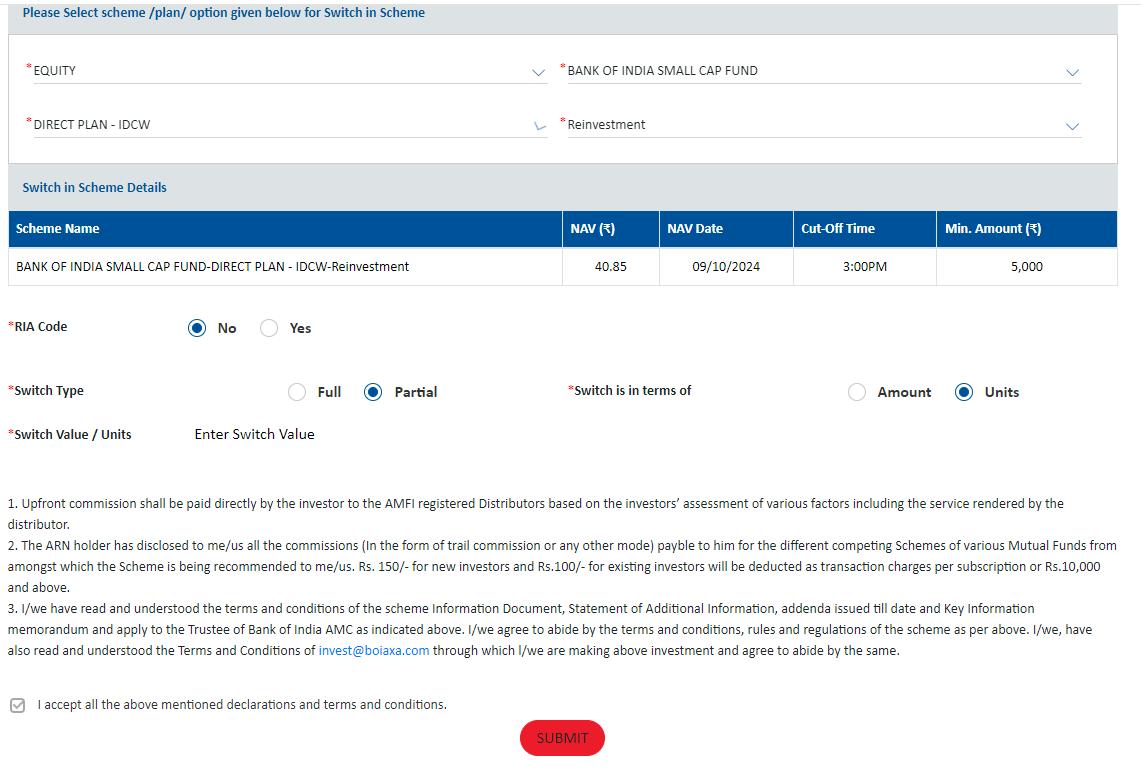
Step 8: Confirm Transaction
Once all information is verified, click Submit to complete the redemption process.
How are the Equity Schemes Different from other Equity Schemes of Bank of India Mutual Fund?
| Differentiation factors | Bank of India Large & Mid Cap Equity Fund (BOILMCEF) | Bank of India ELSS Tax Saver (BOITAF) | Bank of India ELSS Tax Saver (BOITAF) Bank of India Manufacturing & Infrastructure Fund (BOIMIF) | Bank of India Balanced Advantage Fund (BOIBAF) | Bank of India Mid & Small Cap Equity & Debt Fund (BOIMSCEDF) | ||
| Type of Scheme | An open ended equity scheme investing in both large cap and mid cap stocks | An open ended equity linked saving scheme with a statutory lock in of 3 years and tax benefit | An open ended equity scheme investing in manufacturing and infrastructure sectors | An Open Ended Dynamic Asset Allocation Fund | An open ended hybrid scheme investing predominantly in equity and equity related instruments | ||
|---|---|---|---|---|---|---|---|
| Objective of the Scheme | The Scheme seeks to generate income and long-term capital appreciation by investing through a diversified portfolio of predominantly large cap and mid cap equity and equity related securities including equity derivatives. The Scheme is in the nature of large and mid cap fund. The Scheme is not providing any assured or guaranteed returns. | The Scheme seeks to generate long-term capital growth from a diversified portfolio of predominantly equity and equity-related securities across all market capitalisations. | The Scheme seeks to generate long term capital appreciation through a portfolio of predominantly equity and equity related securities of companies engaged in manufacturing and infrastructure related sectors. Further, there can be no assurance that the investment objectives of the scheme will be realized. The Scheme is not providing any assured or guaranteed returns | Bank of India Balanced Advantage Fund aims at providing long term capital appreciation / income from a dynamic mix of equity and debt investments. There is no assurance that the investment objectives of the Scheme will be realized and the Scheme does not assure or guarantee any returns. | The scheme's objective is to provide capital appreciation and income distribution to investors from a portfolio constituting of mid and small cap equity and equity related securities as well as fixed income securities. However there can be no assurance that the income can be generated, regular or otherwise, or the investment objectives of the Scheme will be realized. | ||
| Asset Allocation |
|
|
|
|
|
|
|
| Who should invest in the scheme | The fund is suited to investors with some prior experience in equity investing or even for first time equity investors who are aware of the risk associated with investing in equities, particularly with regard to mid and small capitalization companies. | The fund is suitable for investors with a long-term investment horizon. In terms of fund management, the 3 year lock-in period gives the fund manager the comfort of planning his investments with a long-term horizon. | The Scheme would be more suitable for investors who are desirous of increasing their exposure to manufacturing & infrastructure sector in their personal equity portfolio. Thus, this Scheme could act as a "top up" over existing investments of such investors in diversified equity funds. | By dynamic asset allocation, the scheme aims to reduce volatility as compared to a pure equity fund. Thus, the scheme is suited to the more conservative investors or even first time investors in equities. However, since the fund would normally have exposure to equities, investors should be aware of the risk associated with equity investments. | BOIMSEDF is a Equity fund investing in mid and small cap equity stocks (i.e. not part of the top 100 stocks by Market capitalization) as well as fixed income securities. While the fixed income component of the portfolio is expected to provide some buffer from the volatility of mid and small caps, a 65% portion of the portfolio will always be invested in mid cap equities. Hence, investors must understand the higher risk and volatility involved with investing in mid and small caps as compared to large cap stocks. | ||
| Assets under Management (As on May 31, 2024) (Rs. in crore) | 318.90 | 1,326.94 | 340.61 | 127.53 | 755.65 | ||
| No of folios as on May 31, 2024 | 17,655 | 142,914 | 23,375 | 3,267 | 30,668 |
How are the Debt Schemes Different from other Debt Schemes of Bank of India Mutual Fund?
| Differentiation factors | Bank of India Credit Risk Fund (BOICRF) | Bank of India Liquid Fund (BOILF) | Bank of India Ultra Short Duration Fund (BOIUSDF) | Bank of India Short Term Income Fund (BOISTIF) | Bank of India Overnight Fund (BOIOF) | Bank of India Conservative Hybrid Fund (BOICHF) |
|---|---|---|---|---|---|---|
| Type of Scheme | An open ended debt scheme predominantly investing in AA and below rated corporate bonds (excluding AA+ rated corporate bonds.) A Moderate Interest Rate Risk and Relatively High Credit Risk. | An Open Ended Liquid Scheme. A Relatively Low Interest Rate Risk and Moderate Credit Risk. | An open ended ultra-short term debt scheme investing in instruments with Macaulay duration of the portfolio between 3 months and 6 months. A Relatively Low Interest Rate Risk and Moderate Credit Risk. | An open ended short term debt scheme investing in instruments with Macaulay duration of the portfolio between 1 year and 3 years. A Moderate Interest Rate Risk and Moderate Credit Risk. | (An open ended debt scheme investing in overnight securities. A Relatively Low Interest Rate Risk and A Relatively Low Credit Risk. | An open ended hybrid scheme investing predominantly in debt instruments) |
| Objective of the Scheme | The Scheme’s investment objective is to generate capital appreciation over the long term by investing predominantly in corporate debt across the credit spectrum within the universe of investment grade rating. To achieve this objective, the Scheme will seek to make investments in rated, unrated instruments and structured obligations of public and private companies | The Scheme seeks to deliver reasonable market related returns with lower risk and higher liquidity through portfolio of debt and money market instruments. The Scheme is not providing any assured or guaranteed returns.Further, there is also no assurance that the investment objective of the Schemes will be achieved | The Scheme seeks to deliver reasonable market related returns with lower risk and higher liquidity through portfolio of debt and money market instruments. The Scheme is not providing any assured or guaranteed returns. | The Scheme seeks to generate income and capital appreciation by investing in a diversified portfolio of debt and money market securities.However, there can be no assurance that the income can be generated, regular or otherwise, or the investment objectives of the Scheme will be realized. The Scheme is not providing any assured or guaranteed returns. | The investment objective of the scheme is to generate income commensurate with low risk and high liquidity by investing in overnight securities having residual maturity of 1 business day. However, there can be no assurance that the investment objectives of the Scheme will be realized. The Scheme does not assure or guarantee any returns | The Scheme seeks to generate regular income through investments in fixed income securities and also to generate long term capital appreciation by investing a portion in equity and equity related instruments. However, there can be no assurance that the income can be generated, regular or otherwise, or the investment objectives of the Scheme will be realized. |
| Who should invest in the scheme | An investment in the Scheme is suitable only for long-term, sophisticated investors. Investors must understand and accept the extent of the Scheme's exposure to the underlying credit risks and lack of liquidity of its investments. | Suitable for short-term deployment of funds - Investment horizon of 1 day to 3 months. It is an ideal investment avenue for very short-term parking of excess liquidity. | An ideal investment avenue for short to medium term parking of funds - Investors with an investment horizon of 3 to 6 months. | An ideal investment avenue for those with an investment horizon of 1 year to 3 years. | The Scheme invests in fixed income securities as well as equity securities. The Scheme is suited to more conservative investors, who are looking for generate some capital appreciation over regular fixed income return. However, since the fund would normally have exposure to equities, investors should be aware of the risk associated with equity investments. | |
| Asset Allocation |
| Debt instruments (including Asset Backed Securities*), Money Market Instruments and floaters having a residual maturity of upto 91 days-0%-100% (Low) * Investments in Asset Backed Securities (Securitised debt) will not exceed 20% of the net assets as at the time of purchase. | Investment in Debt & Money Market instruments such that the Macaulay duration* of the portfolio is between 3 months and 6 months-0% to 100%-(Low to Medium) *Macaulay Duration - Macaulay duration is the weighted-average term to maturity of the cash flows from a bond, where the weights are the present value of the cash flow divided by the price. | Investment in Debt & Money Market instruments such that the Macaulay duration* of the portfolio is between 1 year - 3 years-0% to 100%(Low to Medium) *Macaulay Duration - Macaulay duration is the weighted-average term to maturity of the cash flows from a bond, where the weights are the present value of the cash flow divided by the price. | Debt and Money Market - Instruments with residual maturity of 1 business day-0% -100% (Low) |
|
| Assets under Management (As on May 31, 2024) (Rs. in crore) | 129.09 | 1,654.60 | 145.02 | 78.83 | 70.61 | 72.41 |
| No of folios as on May 31, 2024 | 457 | 4,090 | 4,046 | 4,051 | 3,112 | 2,553 |